 Home
Home Search
 Login
Login Register
 Show Posts
1
General Discussion / =-= How to BUY a rank on our webstore =-=
« on: August 29, 2017, 09:50:17 pm » /center]
Hey and welcome to another thread!
In this tutorial you will see how to make a donation to the server.
To begin with,
The first thing you must do is open the web-store. The link is:
http://store.potatoparadise.uk.to.
After that you may choose:
- In-Game Items/Ranks
- Merch
So in case you selected In-Game Perks/Ranks go ahead and follow these steps.
You must have been redirected in a page like this:
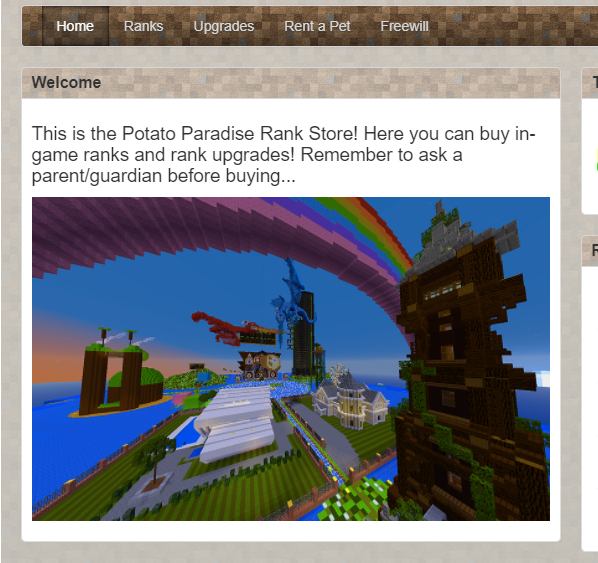 .
.Choose what you want to buy from Ranks, Upgrades, Pets Or select the Freewill Donation for a custom donation.
If you in-fact want to buy a rank click on it, put you In-Game name just like the following:

And now click Continue

You may now notice that there are two ranks (Potato and Potato+).
Select one buy clicking buy. (Potato rank costs 5.94 USD and Potato+ 11.88 USD).
Read the perks and click Add to card.
Like that:

After you selected your rank make sure you fullfill your details, like that:
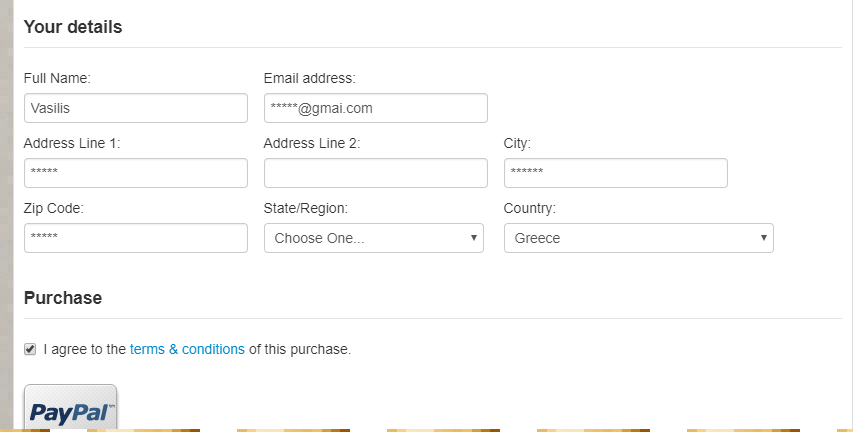
Click I accept the terms & conditions (It's adviced you read them!).
Now all that remains is to pay with your PayPal account. If you do not have one make sure you create one!
That is it, I think this thread covers everything! Any questions may be asked in the replies! Thank you all for spending time to read this =D

 :
: